Free cross stitch letters and alphabet charts, generated as you type. Pick a cross stitch font, type a name, a word, or a whole phrase, and the grid below shows exactly what to stitch. Choose from 22 lettering styles, add an optional second line for a caption or date, set your DMC thread color, fabric count, and letter height, and the live stitch count and finished size update instantly. Free to use, no account needed to build a chart, and when you like the result enter your email and we will send you the finished chart as a PNG. The charts work for needlepoint too, since both count one stitch per square.
Each filled square is one full cross-stitch in your chosen color. Lower fabric counts draw bigger on the grid above and finish larger; higher counts finish smaller and finer. Add margins for framing. First time, the email is the only way to get a copy; we’ll remember you for 7 days after that so you can just hit download.
How to use the alphabet chart
Type any name or short word above. Each dark square on the grid is one cross-stitch worked in the DMC color you selected, so you can follow the chart square by square straight onto your aida. The bolder lines every ten squares match the standard gridlines on a printed cross-stitch pattern, which makes counting easier.
Every lettering style is charted on its own grid, so the taller ones carry more detail and the short ones pack into tighter spaces. Block is a compact alphabet that is quick to stitch and reads cleanly even small. Bold serif is taller with more presence, nice for a monogram. Heavy slab and Gothic carry the most weight, good for a bold monogram or heading. Tall and Tiny are condensed styles made for fitting text into a narrow band or a small space. Rounded has a softer, friendlier look. Script has a flowing, slanted look for a softer feel. Outline is a hollow style you can leave open or fill with a second color. Bubble is a rounded, novelty style good for kids' projects. Western carries a saloon-sign flourish, nice for rustic or ranch-themed pieces. Handwritten mimics a casual marker script for a personal, informal feel. Typewriter gives a vintage, mechanical look for labels and journaling pages. Elegant and Elegant Script bring a refined, formal feel suited to wedding or anniversary pieces. Pixel is a chunky video-game style with square, blocky letterforms. Poster and Chunky are bold, heavyweight styles that stand out from across a room. Casual and Sketch read like relaxed hand lettering. Playful is a rounded, bubbly style with extra personality. Festive has a whimsical, holiday-card feel, nice for winter or Christmas pieces.
Use fabric count to control the real-world size: a lower count like 11 ct gives bigger letters, a higher count like 18 ct gives smaller, finer ones, and the preview resizes to match. Use letter height to scale the whole word up to double or triple its stitch count when you want a bolder result on the same fabric.
Use the second line field to add a caption under your main word, a date, a short quote, or "est. 2020" under a family name, sized independently with the second line size control. This is built for the same charts stitchers use on birth samplers, wedding pieces, and ornaments where a name pairs with a date or phrase.
Frequently asked questions
Can I change the size of the letters?
Two ways. Change the fabric count to change the finished physical size, or use the letter-height control to scale the stitch count itself up to 2x or 3x. The finished-size readout updates with both.
Does this work for needlepoint?
Yes. Needlepoint is also a counted technique with one stitch per canvas hole, so these charted alphabets work directly, just stitched in tent stitch instead of cross stitch. For freehand surface embroidery you would trace an outline letter rather than follow a grid, which is a different kind of pattern.
Can I make a caption with two lines, like a name and a date?
Yes. Type your main word or name in the first field, then add a date, quote, or short phrase in the second-line field below it. Set the second line's size independently, smaller for a subtitle-style caption or the same size to pair two equal lines, and both chart together as one design.
How do I get a copy of my chart?
Enter your email above and we will send the finished chart to your inbox as a PNG, with the thread color, fabric count, and stitch count printed right on it. There is no download or print button on the page itself the first time; the email is the only way to get a copy of your chart. Come back within 7 days and we will remember you, so you can skip the form and download the chart again with one click.
Which DMC color should I use?
The swatches above are popular lettering colors. For text you usually want good contrast: dark thread on light aida, or light thread on dark. Black (DMC 310) and a deep charcoal (DMC 3799) are the most common choices for names and monograms.
Is this a cross stitch text or word generator?
Yes. Type a single letter for a monogram, a full name, or a whole phrase, and the generator charts it the same way, one square per stitch, sized to your fabric count. There is no length limit built in, though long phrases read more easily split across two lines when you stitch, which is exactly what the second-line field is for.
Is this a cross stitch caption maker?
Yes. Pair the main text field with the second-line field to build a two-line caption, a name over a date, a phrase over a name, sized and fonted to match, then email yourself the finished chart to stitch from.
Like this tool? StitchLand is just getting started.
These tools are free and always will be. Save your stitcher name now to join the invite-only community beta. Tracking your stash, sharing what is on the hoop, and finding other stitchers are all on the way.
When your wave opens, you get a free stash for up to 50 floss colors, 5 patterns, and 5 fabrics, your stitcher name locked in, and a real say in what we build next.
Free cross stitch letters and alphabet charts, generated as you type
This is a cross stitch alphabet chart maker, letter generator, and font maker in one. Type a name, a word, or a whole phrase and it charts the letters onto an aida grid one stitch per square, in the DMC color and fabric count you pick, with the stitch count and finished size worked out for you. Nothing to install, no account, and no hunting for a printable alphabet PDF and graphing letters onto paper by hand. If you are brand new to counted cross stitch, start with our how to cross stitch for beginners guide.
How do you chart a name or word for cross stitch?
Quick answer: pick a lettering style, type your word, and chart each letter onto the aida grid one stitch per square, leaving a one-square gap between letters. The width in stitches is the sum of the letter widths plus the gaps, and the height is the tallest letter in the style. Divide those stitch counts by your fabric count to get the finished size in inches. The charter above does all of this live as you type, on real fabric counts, in your chosen DMC color, with the stitch count and finished size updating instantly. It works for needlepoint too, since both crafts count one stitch per square.
How the generator works
Type a name or word in the box and the grid redraws immediately. Every letter is a fixed pixel map, so each filled square is exactly one cross stitch. You choose four things: the lettering style, the thread color from a DMC palette of real floss hexes, the fabric count, and the letter height. There is also an optional second line, for a date or a short caption under the main word. When the chart looks right, enter your email and we will send the finished chart to your inbox as a PNG, ready to stitch from. Come back within 7 days and we will remember you, so a return visit skips straight to a one-click download instead of the email form.
Cross stitch alphabet examples: names, initials and dates
These examples use the fonts in the generator above. Each filled square is one cross stitch. The measurements describe the chart area, not the fabric to cut; add space for your border and finish.
A cursive name in Elegant Script
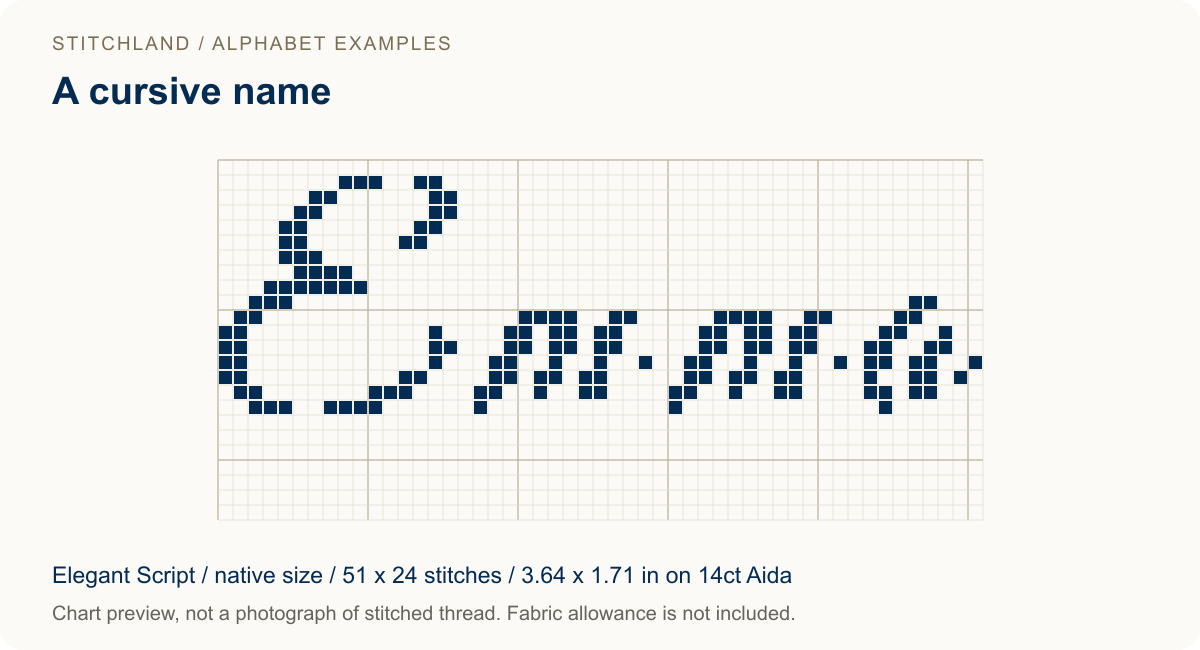
For a cursive-style name, choose Elegant Script, type Emma, leave the second line empty and keep the letter height at its native setting. Check the joins and narrow strokes at your chosen fabric count before stitching a longer name.
A small monogram in Tiny
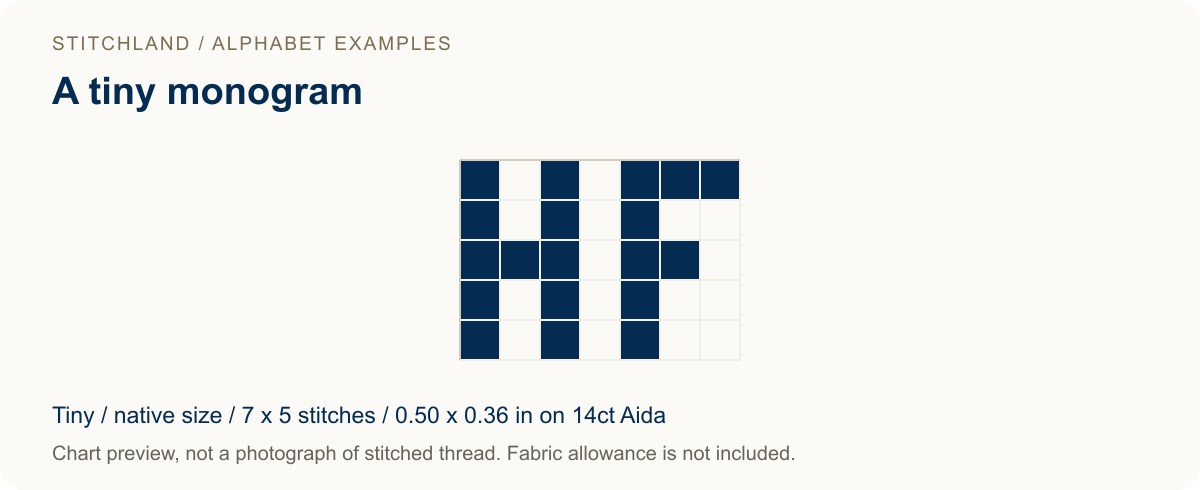
Choose Tiny and type HF to reproduce this small monogram. The five-stitch height works when space is tight, though the simple letter shapes have less detail than the larger fonts. The preview is enlarged so you can see the squares.
A holiday name and year on two lines
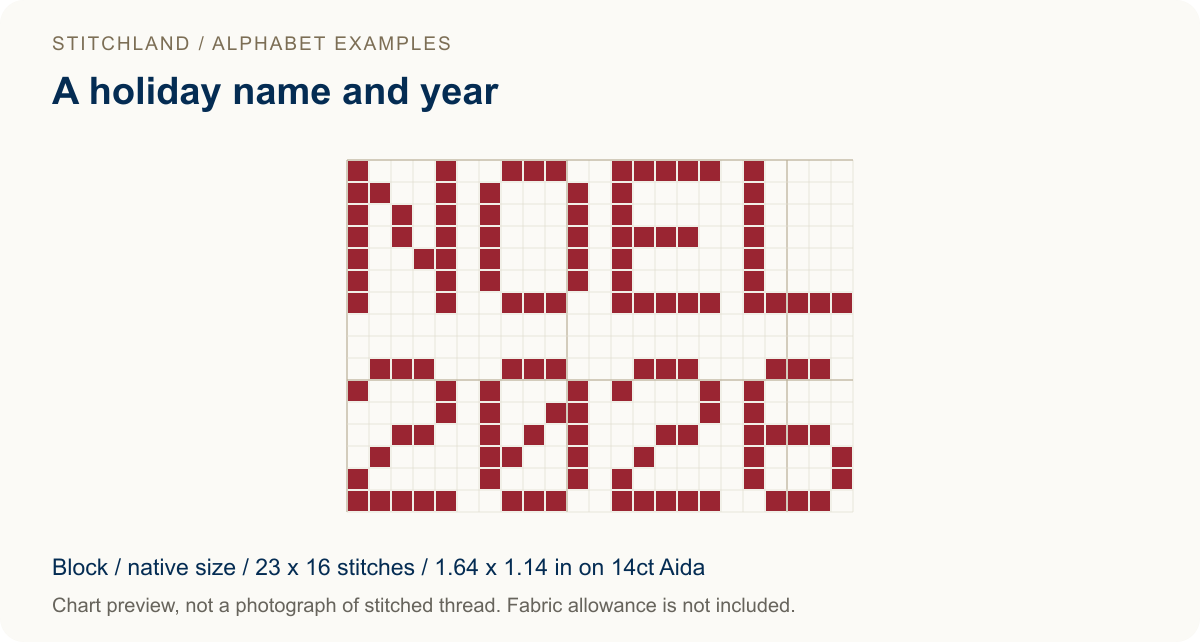
Choose Block, put NOEL in the first line and 2026 in the second. Leave both letter heights at native size. The generator centers the two lines and includes a two-row gap between their grids. Swap in your own name and date, then use the updated dimensions rather than the sample measurements. Looking for a bigger holiday project to go with it? Browse our free Christmas cross stitch patterns.
All three are chart previews, not photographs of finished stitching. Changing the fabric count changes the physical size; scaling the letter height changes the stitch grid. Use the generator above to make your version, or check your fabric allowance in the fabric calculator.
Choosing a cross stitch font
Every font here is charted on its own grid, so the taller styles carry more detail and the short ones pack into tighter spaces. The style picker above is the place to check what is currently available, since new lettering styles get added over time. Broadly they fall into four groups:
- Workhorse styles such as Block and Rounded. Quick to stitch, readable even when small, and the safest pick for a long word or a full phrase.
- High-impact styles such as Bold serif, Heavy slab, and Gothic. Taller grids and far more filled squares, which makes them right for a monogram, a title, or a single initial.
- Space-savers such as Tall and Tiny. Condensed grids for small cross stitch letters that have to fit a narrow band, a corner, or the bottom edge of a finished piece.
- Decorative styles such as Script, Outline, Bubble, Western, and Handwritten. Outline is hollow, so you can leave the centers open or fill them with a second color.
If you are undecided, chart the same word in two or three styles and compare the stitch counts before you commit. A heavier font can easily double the work for the same finished width.
Free cross stitch alphabet patterns without the PDF hunt
Most free cross stitch alphabet patterns online are fixed images: one size, one style, and you count squares off a screenshot. Because this one generates the chart, the pattern gets built around your text rather than the other way round. Change the fabric count and the finished size updates. Change the style and the whole word re-charts. Add a second line and it centers itself under the first. The chart you email yourself is the pattern, already sized for fabric you actually own.
How fabric count sets the finished size
The number of stitches in your word never changes with fabric, but the physical size does. Fabric count is stitches per inch, so a higher count packs the same letters into a smaller space. The finished size is simply the grid width and height in stitches divided by the count. The charter shows this in both inches and centimeters, and it also resizes the on-screen grid so a 28-count chart looks finer than an 8-count one.
| Fabric | Stitches per inch | A 70-stitch-wide word measures |
|---|---|---|
| 8 ct Aida | 8 | about 8.8 in |
| 11 ct Aida | 11 | about 6.4 in |
| 14 ct Aida | 14 | about 5.0 in |
| 16 ct Aida | 16 | about 4.4 in |
| 18 ct Aida | 18 | about 3.9 in |
| 32 ct linen over 2 | 16 | about 4.4 in |
Evenweave and linen worked over two threads behave like half their count: 28-count over two is effectively 14 stitches per inch, and 32-count over two is 16. The fabric menu lists the common Aida, evenweave, linen, and Hardanger options with their effective counts already worked out. Working out fabric for a full pattern instead of just a name or word? Our fabric calculator runs the same over-two math for an entire stitch count.
Letter height: bigger letters, more stitches
The letter-height control scales the chart itself. Standard charts the font at its native grid; Double doubles every letter to 2x, and Triple takes it to 3x. This multiplies the stitch count, not just the on-screen zoom, so a doubled word genuinely takes four times the stitches and reads much larger on the same fabric. Use it when you want a bold heading on coarse fabric, or pair a low fabric count with standard height for a quick result.
Picking a thread color
The color swatches are real DMC floss colors pulled from StitchLand’s floss data, so the chart previews close to how the finished stitching will look. The chart is single-color by default, which is all most lettering needs. If you want a two-tone effect, the outline style gives you a natural place to add a second color by filling the hollow centers.
A few more questions
Can I make a monogram or just initials?
Yes. Type one, two, or three letters for a monogram. The bold serif, heavy slab, and gothic styles have the most presence for initials, while tall and tiny work when space is tight.
Do I need an account or software?
No. The generator runs in your browser and is free to use. When the chart looks right, enter your email and we will send you the finished PNG to stitch from. Come back within 7 days and we will remember you, so you can skip the form and download the chart again with one click.
How do I space the letters?
The charter leaves a one-square gap between letters automatically, which keeps the word evenly spaced. For wider spacing you can add an extra blank column by eye when you stitch, or stitch a space between words.
This cross stitch alphabet charter is one of several free tools from StitchLand, the modern home for needlework. More tools, and an invite-only community beta, are on the way.